

Overview
Booth Types in Chati allow you to group spaces and entitle those groups through registration packages. This is particularly useful when you want certain attendee packages to access specific exhibitor areas.
What Are Booth Types?
Booth Types are categories that you can assign to exhibitor spaces in your event. They allow you to:
- Group similar booths together
- Control which packages can access which booth areas
- Quickly assign multiple booths to a registration package
- Create tiered exhibitor experiences
Common Use Cases
- Sponsor Tiers: Platinum, Gold, Silver sponsor booth areas
- Industry Segments: Technology, Healthcare, Finance booth sections
- Access Levels: VIP-only booths, General access booths
- Booth Sizes: Premium large booths, Standard booths
Step-by-Step: Creating Booth Types
Step 1: Access Booth Type Settings
- Log in to your Chati admin account dashboard
- Select Account Settings (in the account level)
- Scroll down and select “Booths”
- Choose Booth Types
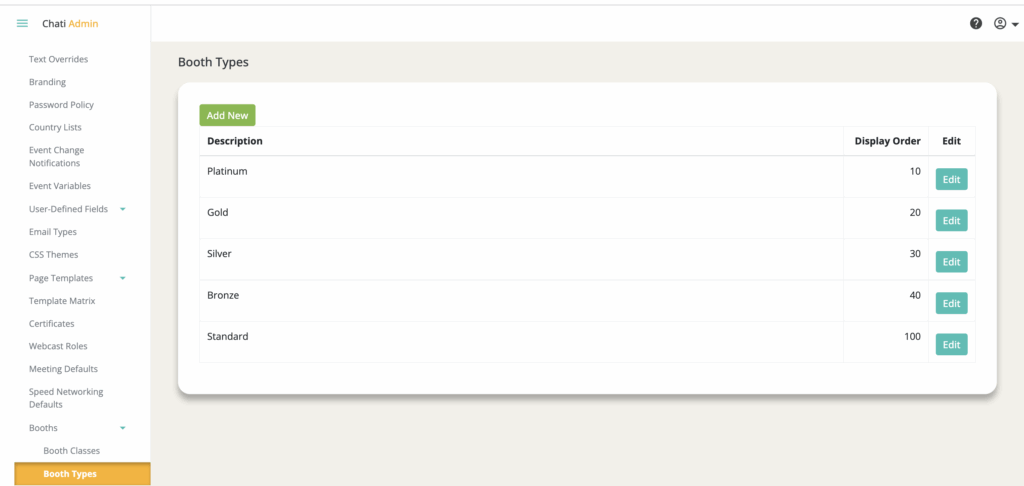
Step 2: Create a New Booth Type
- Click "Add New”
- Give the Booth Type a name in the Description
- Click "Save"
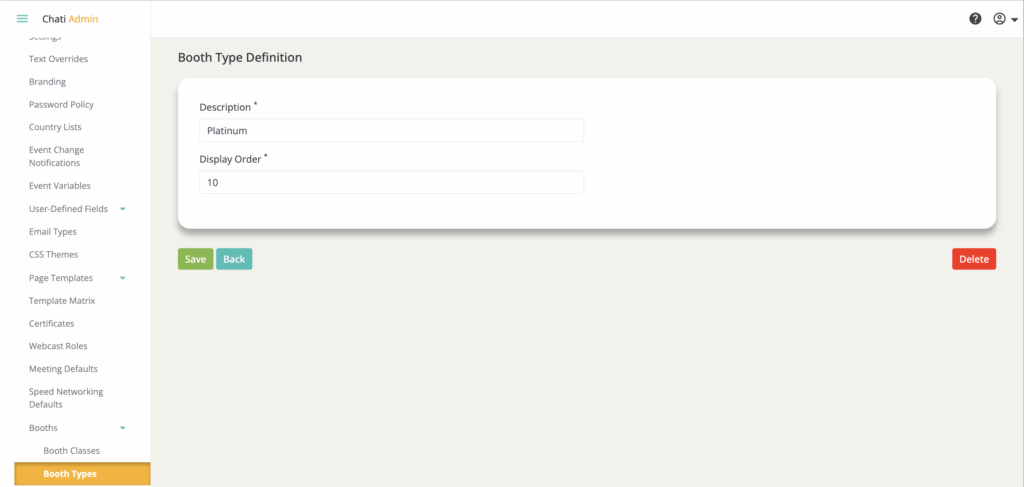
Step 2: Repeat for All Booth Types
Create all the booth types you need for your event:
- Consider your event structure
- Think about access level requirements
- Plan for sponsor tier visibility
Step-by-Step: Assigning Booth Types to Spaces
Step 1: Navigate to the Event Admin
Enter the event admin panel
Step 2: Assign Booth Type to Individual Spaces
- Select an Exhibitor Booth, Space, or Poster
- Click “Advanced Settings”
- Find the "Type” dropdown
- Select the appropriate booth type from your created list
- Save the changes
Repeat for each item that needs a type assignment

Step-by-Step: Adding Booth Types to Registration Packages
Step 1: Open Package Settings
- Navigate to Registration --> Packages
- Select the package you want to edit
Step 2: Add Booth Type as Package Item
- In the Package Items section, click "Add Item"
- Select "Specific Booth Type" as the item type
- Choose the specific booth type from the dropdown
- Click "Save" to include in the package
Note: If users have already begun to register for the package, don’t forget to toggle on the “Update current registrant’s packages with these changes” option before saving. This ensures that all existing users with that package will have access to that booth type.
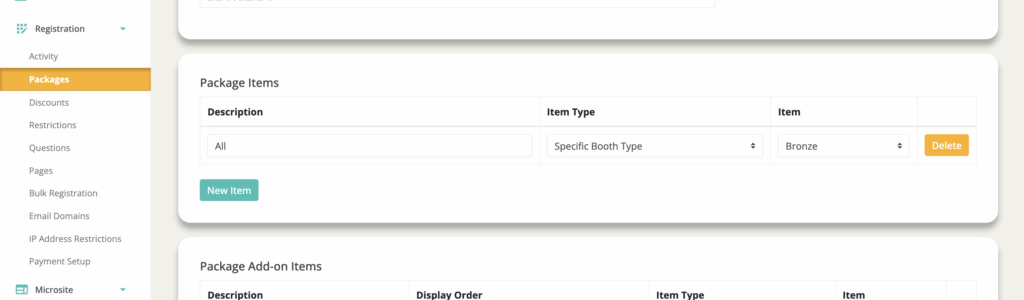
You're done! It's that easy.
- Attendees with this package will now be able to access all booths assigned to the selected booth type(s)
- They will see an error if they try to access booths not included in their package
Benefits of Using Booth Types
Efficiency:
- Assign a booth type once to a package, rather than adding individual booths
- Faster setup when you have many exhibitor spaces
- Easier to manage when booth assignments change
Flexibility:
- Quickly reorganize which packages can access which exhibitor areas
- Create exclusive exhibitor experiences for premium packages
Scalability:
- Easily add new booths to existing types
- Maintain consistent access control across large exhibitor halls
- Simplify package management for events with many exhibitors
Best Practices
- Define your booth type structure before creating individual exhibitor booths
- Align booth types with your sponsorship tiers if applicable
- Consider attendee experience when grouping booths