

Chati is organized into two levels: the account level and the event level. Understanding what lives where helps you configure things in the right place from the start.
Account level vs. event level
Every Chati account can contain multiple events. Think of the account as your organization's home base — it holds everything that spans across your events — while each individual event has its own unique configuration and content.
For example, a single account might contain an annual conference, a product launch webinar, and a regional summit. Each of those events has its own spaces, sessions, and registration setup. But the users, branding defaults, shared assets, and cross-event reports all live at the account level above them.
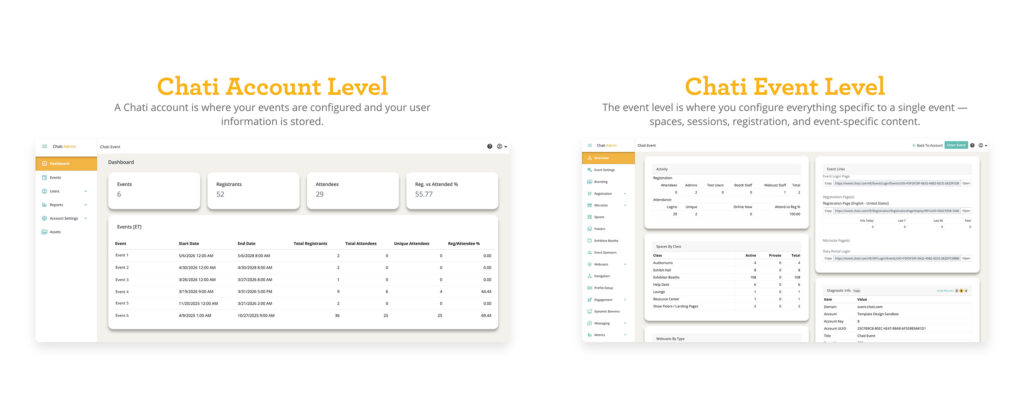
What's managed at the account level
Use the account level when you want something to apply to all of your events, or when you're managing users and settings that exist independently of any single event.
Adding a Handout
Go to the Handouts tab and click Add New. Each handout has the following settings:
| Setting | Value/Description |
| Dashboard | See totals across all of your active and upcoming events — registrants, attendees, and attendance rates — in one view. Click on an event to enter the event configuration portal. Not all admins will have access to the same events in a single account, so data may differ depending on who is looking at the dashboard. |
| Events | View, access, and create events. All new events are created from the account level. Click on an event to enter the event configuration portal. |
| Users | All attendee and admin user profiles live here. A person who attends multiple events is still one user profile in the system. |
| Settings | Set defaults for branding and text overrides that apply across all events automatically. |
| Assets | Upload logos, backgrounds, and media to the account-level library to make them available across all events. |
| Reports | Create report templates once at the account level and they cascade to all events automatically. |
Note: Event-level settings always take priority over account-level settings. If you set a text override at both levels, the event-level version wins for that event.
What's managed at the event level
The event level is where you configure everything specific to a single event — spaces, sessions, registration, and event-specific content.
- Event spaces, booths, and posters
- Session and schedule setup
- Registration configuration and pages
- Event-specific text overrides
- Event-specific assets
- Event-specific reports (can also be copied from account-level defaults)
About Chati accounts
A Chati account is where your events are configured and your user information is stored. Accounts can be freestanding (independent) or connected to a Master Account.
Master Accounts are useful if your organization runs multiple sub-accounts and you want to enforce consistent templates and settings across all of them. If you think your organization may benefit from a master account, contact you Chati support representative.
Every account has a Primary Contact — the account owner — who acts as the main point of escalation for event configuration, delivery, and contract-related questions such as overages.
Only approved administrators can access a Chati account. Access levels range from View Only to Full Access, and are controlled through Chati User Roles, which are customized per account.
Note: To create a new account, contact Chati directly. Accounts are not self-serve.